%20{%20:root%20{%20--deepread-stroke:%20%23E5E7EB;%20}%20}%20.dark%20{%20--deepread-stroke:%20%23E5E7EB;%20}%20%3c/style%3e%3crect%20x='40'%20y='30'%20width='220'%20height='260'%20rx='28'%20ry='28'%20stroke='var(--deepread-stroke)'%20stroke-width='16'%20fill='none'/%3e%3cpath%20d='M180%2030v52c0%2010%208%2018%2018%2018h62'%20stroke='var(--deepread-stroke)'%20stroke-width='16'%20fill='none'/%3e%3cline%20x1='70'%20y1='130'%20x2='200'%20y2='130'%20stroke='var(--deepread-stroke)'%20stroke-width='16'%20stroke-linecap='round'/%3e%3cline%20x1='70'%20y1='165'%20x2='200'%20y2='165'%20stroke='var(--deepread-stroke)'%20stroke-width='16'%20stroke-linecap='round'/%3e%3cline%20x1='70'%20y1='200'%20x2='170'%20y2='200'%20stroke='var(--deepread-stroke)'%20stroke-width='16'%20stroke-linecap='round'/%3e%3c!--%20green%20download%20arrow%20in%20bottom%20right%20corner%20--%3e%3cpath%20d='M210%20202v58'%20stroke='var(--deepread-accent)'%20stroke-width='18'%20stroke-linecap='round'/%3e%3cpath%20d='M195%20245l15%2015%2015-15'%20fill='none'%20stroke='var(--deepread-accent)'%20stroke-width='18'%20stroke-linecap='round'%20stroke-linejoin='round'/%3e%3c/svg%3e)
AI-Powered AP Automation Tools Comparison: A Buyer's Guide
A practical comparison of AI-powered AP automation platforms - what separates real AI from OCR-with-branding, and how to evaluate one for your team
Introduction
Almost every AP automation vendor now calls itself "AI-powered." That phrase has stopped being a differentiator and become a checkbox, so it tells you very little about whether a platform will cut manual invoice work or just put a nicer interface on top of it. For a wider view of the category, see this overview of invoice automation software platforms.
This guide compares the landscape by segment and by vendor, explains what "AI-powered" needs to mean to matter, covers compliance screening for regulated buyers, and shows how to evaluate a platform in a trial. It also covers when the better answer is not to buy a platform at all.
Every vendor description below comes from that vendor's own public pages, and every accuracy or touchless figure is vendor-reported unless stated otherwise. No independent test measures these platforms against each other on a common dataset, so treat the entries as a shortlist and confirm pricing and features with each vendor before deciding.
Who This Comparison Is For
- Finance and operations leaders moving from manual or semi-manual AP to an automated platform and trying to match a tool category to their invoice volume and complexity.
- IT and procurement teams at enterprises comparing suites such as Coupa, Basware or SAP Ariba, where implementation timeline and ERP depth usually matter more than raw capability. Integration depth is covered in more detail in this piece on invoice scanner and AP automation integration.
- Compliance and privacy officers at regulated businesses (banking, healthcare, insurance) who need automated AP that is audit-ready, not just fast.
- Engineering and product teams deciding whether to buy a platform or build a custom workflow, because no existing product fits an unusual invoice format or internal system. Teams on that path can start with this guide to an OCR API for invoice processing.
What "AI-Powered" Is Supposed to Mean
The pitch across the category is consistent: AI should handle complex, unstructured or scanned invoices with higher accuracy and fewer exceptions than traditional template-based OCR. Some platforms deliver that. Others run automation that is mostly rules-based or ERP-centric, with AI applied to a single step such as coding suggestions or fraud flags.
The question worth asking any vendor is whether the tool reduces exceptions on your invoice mix, or just moves the manual work from data entry to exception review. Capture at both header and line level matters here, because line-level coding is where many invoices fall out of automation, as this comparison of invoice line item extraction tools shows.
The AP Automation Landscape, by Segment
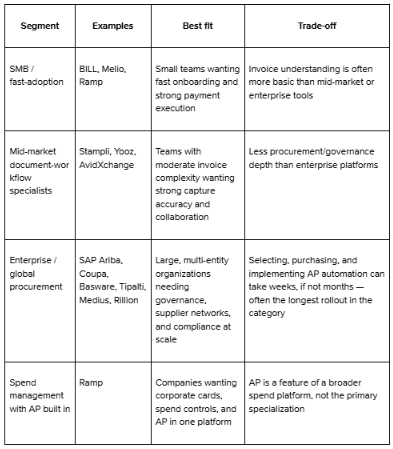
The category splits into three groups. Small-business platforms bundle AP with payments, and often with cards or receivables, and publish their pricing. Mid-market specialists focus on invoice workflow, collaboration and supplier payments, and mostly quote pricing. Enterprise suites add procurement, global compliance and multi-entity governance, and take longer to implement.
A growing number of vendors now describe their capture as LLM-based rather than template-based, a shift covered in this article on GPT-powered AP automation software. Coupa, through its Rossum acquisition, and Rillion both describe their capture this way on their own sites.
Each entry below uses the same six points. Prices are as listed on the vendor's own pages at the time of writing.
Small-Business Platforms
Ramp
- What it automates: Invoice capture with OCR, approval routing, vendor payments by ACH, card, check or wire, and ERP sync, alongside Ramp's corporate cards and expense tools. Ramp describes four AI agents for coding, fraud monitoring, approval summaries and card payments.
- Pricing: A free plan with no monthly software fee for core Bill Pay features. Ramp Plus is listed at $15 per user per month plus a platform fee based on team size, and Enterprise is custom. Payment fees depend on the method, for example $0.59 for standard ACH and $1.99 for a standard check.
- Limits: Ramp states that auto-coding and approval recommendations are available only to Plus customers, and that certain ERP integrations require Plus. Ramp's small-business guide also lists two- and three-way matching, batch payments and payment release approvals under Plus.
- Best for: Small and mid-sized teams that want cards, expenses and AP in one system.
- Pros: A usable free tier and flat, published payment fees. Ramp also lets you run Bill Pay on its own without using its cards.
- Cons: The AI coding features sit behind the paid tier, and fees scale with team size on Plus.
BILL
- What it automates: Bill entry, approval workflows, payments by ACH, virtual card, check and international wire, and two-way sync with accounting software, with receivables on the same platform. AI multi-line bill coding is handled by its Invoice Coding Agent.
- Pricing: Published per-user tiers for AP and AR: Essentials $49, Team $65 and Corporate $89 per user per month, with custom Enterprise pricing. Spend and Expense is listed at $0 per user. Some payment types carry per-transaction fees on every plan.
- Limits: AI multi-line bill coding is not included on Essentials. Essentials syncs with QuickBooks and Xero by manual CSV import and export, with automatic two-way sync starting on Team.
- Best for: Small and mid-sized businesses on QuickBooks or Xero that want AP and AR together.
- Pros: Transparent tiers, a broad set of payment methods and a large built-in vendor network.
- Cons: Per-user pricing grows as approvers are added, although BILL lists approver-only discounts on its higher plans.
Melio
- What it automates: AI bill capture from email, upload or scan, multi-level approvals, payments by ACH, card, wire or check (including international), and sync with QuickBooks and Xero. Receivables tools are included on every plan.
- Pricing: Go is free with 5 free ACH payments a month. Core is $25 a month (20 free ACH), Boost is $55 (50 free ACH) and Unlimited is $80 with unlimited ACH and users. Extra ACH payments cost $0.50, and card payments carry a fee of about 2.9%.
- Limits: Melio describes itself as built for US businesses. Advanced approval routing by vendor, amount or user, and QuickBooks Desktop support, start on Boost.
- Best for: Very small businesses and accounting firms that want to start free.
- Pros: A genuinely free entry plan and predictable flat plan prices.
- Cons: Its plans are built around payment volume and small teams, and AP depth for larger finance teams is concentrated in the higher tiers.
Mid-Market Platforms
Stampli
- What it automates: Invoice capture, coding, approvals and exception handling around a single invoice record, with its AI assistant Billy. Stampli positions itself as a procure-to-pay platform that also covers procurement, payments, cards and vendor management.
- Pricing: Custom. Stampli says its pricing includes unlimited users and vendors, but no list prices are published.
- Limits: Semi-automated two- and three-way matching is included, and full automation by Billy is listed as an available option. Stampli's own pages say AI coding suggestions are reviewed by AP before posting.
- Best for: Teams that want collaboration on invoices and a fast rollout on top of an existing ERP.
- Pros: Communication, documents and audit history sit on the invoice, and Stampli lists integrations with 70+ ERPs.
- Cons: No public pricing to compare against, so a quote is required just to shortlist it.
Yooz
- What it automates: Omnichannel invoice capture, smart data extraction, line-level PO matching, routing, fraud detection and payment approval and execution.
- Pricing: Gold Edition is priced on the volume of documents processed, with unlimited users and four hours of complimentary service. A 15-day free trial in a production environment is offered.
- Limits: Pricing depends on document volume, so cost scales with invoices rather than seats.
- Best for: Mid-sized and growing companies that want strong document processing and fraud checks.
- Pros: A trial on your own documents, and Yooz lists integrations with 250+ ERPs.
- Cons: Savings and accuracy figures on its site are vendor estimates, so confirm them on your own invoices.
AvidXchange
- What it automates: Invoice automation, purchase order automation, payment automation, and an AI approval agent, backed by the AvidPay supplier network. Invoice data is extracted by AI and validated by human indexing specialists.
- Pricing: Not published on the pages reviewed. Request a quote.
- Limits: AvidXchange states that its AI is designed to assist rather than replace judgment, so final coding and approval decisions stay with your team. Its model includes managed services, which suits teams that want an operated service.
- Best for: Mid-market businesses that want supplier payments handled through a large network.
- Pros: AvidXchange reports 99%+ extraction accuracy, more than 1.5 million suppliers on its payment network, and 200+ accounting system integrations.
- Cons: The accuracy figure includes human validation, so it is not a pure automation rate.
Rillion
- What it automates: LLM-based invoice capture without templates, GL coding suggestions, approver prediction, three-way PO matching and payments, with multi-entity management.
- Pricing: Not published on the pages reviewed.
- Limits: Rillion lists 50+ ERP integrations, and its multi-entity and ERP depth is the main reason to choose it.
- Best for: Multi-entity finance teams on Microsoft Dynamics, NetSuite, Sage or SAP.
- Pros: Rillion reports over 95% capture accuracy from the first invoice and lists SOC 1, SOC 2, and CCPA compliance.
- Cons: No public pricing, and the accuracy claim is vendor-reported.
Enterprise and Global Platforms
Tipalti
- What it automates: Supplier onboarding with tax forms, AI invoice capture and coding, two- and three-way PO matching, approvals, ERP reconciliation, and global payments. Tipalti describes an AP Agent and specialized task agents.
- Pricing: Accounts Payable plans start at $99 per month with unlimited users and a supplier portal, plus transaction pricing per invoice and payment. There is no free tier.
- Limits: Costs depend on payment volume, entities, and enabled modules. More complex environments may need professional services.
- Best for: Companies with global supplier payments and tax compliance needs.
- Pros: No per-user or per-approver fees, and self-service supplier onboarding.
- Cons: The final price depends on a quote that reflects volume and modules.
Medius
- What it automates: AI invoice capture, SmartFlow coding, two- and three-way matching, a Copilot for approvers, supplier communication, statement reconciliation and fraud detection.
- Pricing: Not published on the pages reviewed.
- Limits: Medius reports a 96.3% touchless rate for PO invoices and 99.5% for non-PO invoices, but also reports an average across its customers of about 69% in 2025. Your result depends on your invoice mix.
- Best for: Mid-market to enterprise teams with high invoice volume and complex AP workflows across multiple ERPs.
- Pros: A proprietary, AI-native capture model, and published touchless figures to hold the vendor to in a trial.
- Cons: The headline rates describe best-performing customers rather than a typical one.
Basware
- What it automates: SmartPDF capture, SmartCoding for non-PO invoices, flexible line-level matching, e-invoicing, and a set of AI agents, delivered as InvoiceAI.
- Pricing: Not published on the pages reviewed.
- Limits: Basware says SmartPDF converts machine-readable PDFs with above 97% accuracy, which is a narrower claim than accuracy on scans. It cites up to 89% touchless processing for best-in-class customers.
- Best for: Large global organizations that need e-invoicing compliance and cross-ERP control.
- Pros: Strong matching flexibility, including invoices matched to POs created in other systems. Basware also states it was named a Leader in the 2026 Gartner Magic Quadrant for Accounts Payable Applications.
- Cons: It is built for complex enterprise landscapes, which means a longer implementation than small-business tools.
Coupa
- What it automates: Template-free invoice ingestion powered by Rossum's transactional language model, two- and three-way matching, approvals, global payments, expenses, treasury and fraud detection. Coupa announced its acquisition of Rossum on May 12, 2026.
- Pricing: Customized to volume and requirements, with no list price.
- Limits: Coupa notes that its Gartner recognition predates the Rossum acquisition, so that analyst result does not reflect the combined product.
- Best for: Enterprises that want invoicing tied to procurement, payments and spend analytics in one suite.
- Pros: A free supplier portal, e-invoicing compliance support and a Leader position in the 2026 Gartner Magic Quadrant for Accounts Payable Applications.
- Cons: Most of the value comes from adopting the wider Coupa platform, not from AP alone.
SAP Ariba
- What it automates: SAP Ariba Invoicing, which SAP renamed from Central Invoice Management in February 2026. It offers embedded multi-model AI OCR, automatic line-item matching, account and tax code assignment, and the Joule assistant, with e-invoicing through SAP Business Network.
- Pricing: Not published on the pages reviewed.
- Limits: It is aimed at SAP ERP customers, and SAP notes the product runs on SAP Business Technology Platform.
- Best for: Companies already running SAP S/4HANA or other SAP ERP landscapes.
- Pros: Close alignment with SAP ERP data and the SAP Business Network.
- Cons: Less natural for non-SAP shops, and the product has been renamed and restructured recently, so check the current packaging.
Compliance and Security: What Regulated Buyers Should Screen For
If you are evaluating AP automation at a bank, healthcare organization or insurer, "AI-powered" is not the filter that matters most. Auditability is. Beyond the feature comparison, screen for:
- Audit-ready records by default. Can the platform produce a clean, timestamped record on demand, or does that take manual reconstruction later?
- PII and sensitive data handling. Invoices in healthcare and insurance can carry vendor or patient-adjacent data. Ask how the platform detects and handles it, not only how it extracts totals and line items.
- Fraud and anomaly detection depth. Is flagging rule-based with fixed thresholds, or adaptive based on vendor payment history?
- Certifications. SOC 2, ISO 27001 and GDPR support are standard asks. Confirm them directly with the vendor and in writing, rather than assuming them from an "enterprise-grade" label.
- Data residency and access controls, particularly for multi-entity or cross-border operations.
If a vendor cannot answer these directly and quickly, that is itself informative.
The Part That Determines ROI: The Document Layer
Every platform in this category promises faster approvals, fewer errors and audit-ready records. What delivers on that promise sits upstream of the workflow interface: whether the system reads and codes the invoice correctly in the first place.
Advanced platforms add intelligence on top, such as prioritizing invoices with early payment discounts, applying stricter validation to new vendors and notifying suppliers when an invoice is rejected for a specific reason. None of that helps if the invoice was captured wrongly. A platform's ability to extract data from scanned, handwritten or complex invoices with minimal correction is the real accuracy test, not a demo on a clean sample.
The most useful single filter is to ask what percentage of invoices are processed touchless on your actual document mix, and what happens to the rest. A platform with a high exception rate has relocated your manual work, not removed it.
Extraction accuracy is also checkable in a way that platform marketing is not. You can run the same set of documents through several engines and compare the results directly. That is worth asking of any vendor, extraction-focused or full platform: is the accuracy claim backed by a published methodology and dataset, or only by a number on a slide?
How to Evaluate a Tool in a Trial or Demo
A feature checklist only goes so far, because most vendors will tick every box on paper. A useful evaluation looks like this:
- Bring your messiest documents. Use the scanned, handwritten or oddly formatted invoices that cause problems today, not a clean sample.
- Ask for the exception rate on that batch, not the headline accuracy number. As an illustration, a tool that is 95% accurate but silently mishandles the other 5% is riskier than one that is 92% accurate and flags every uncertain field for review.
- Time the approval setup yourself. Have your own team configure one real approval chain during the demo.
- Ask what the AI does at each step: capture, coding, fraud detection and supplier communication. "AI-powered" is often true of only one stage.
- Confirm compliance answers in writing, not verbally on a sales call.
- Ask whether any accuracy claim is independently checkable.
Signs You Have Outgrown Your Current AP Tool
- Your exception queue is growing faster than your invoice volume, so the tool is not adapting to new formats or vendors.
- You are manually re-keying data the tool was supposed to capture.
- Approval routing has become a workaround built on a workaround.
- You need multi-entity or multi-currency support the current tool handles poorly.
- Audit preparation still requires reconstructing records by hand.
Evaluation Checklist
- Capture accuracy on your real invoice mix, including scanned and multi-format documents
- Touchless processing rate, not just "AI-powered" as a label
- ERP and integration depth, native connectors versus manual sync
- Approval workflow flexibility, including multi-level routing and thresholds
- Fraud and duplicate detection, rules-based or adaptive
- Realistic implementation timeline
- Multi-entity and compliance support
- Audit readiness, a clean record on demand
Build vs. Buy: When an Off-the-Shelf Platform Is Not the Answer
Every platform above is built for a fairly standard invoice-to-payment workflow. If your AP process is genuinely standard, buying is almost always the faster and cheaper path.
The gap is for teams whose documents do not fit the standard invoice mold: freight carrier invoices with inconsistent layouts, multi-entity operations with non-standard vendor formats, or teams whose ERP or internal tooling has no clean connector to any platform above. For them the platform is rarely the constraint. The document-capture layer underneath it is.
Some engineering teams route around the platform and build a custom AP workflow on a document extraction API, feeding structured, schema-driven invoice data into their own approval and ERP logic. That approach depends on the extraction layer supporting asynchronous processing for large batches, so one slow job does not block the pipeline, and a way to deliver results into existing systems without manual export.
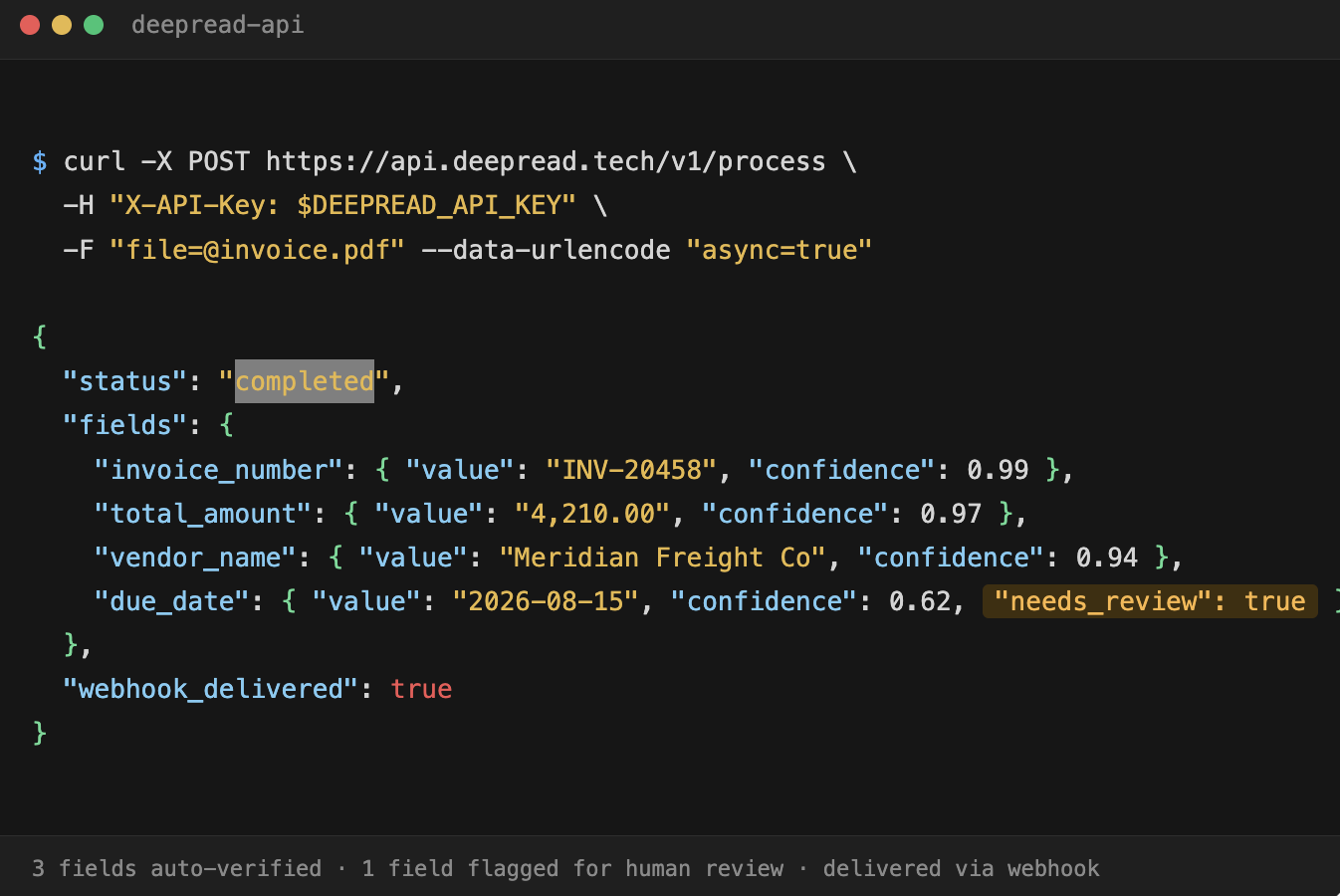
DeepRead is a developer-first OCR and document AI API for that layer. It is not an AP platform, so approvals, coding rules, and ERP posting are yours to build. Extraction is schema-driven, jobs run asynchronously and return a job ID you can poll, and webhook delivery is available on the Standard and Enterprise plans. Each extracted field returns its page, bounding box, and source text, so a reviewer can check it against the original invoice. Fields that need a human look are flagged with needs_review and a review_reason, and a review interface for flagged fields is available on every plan. A failed job costs nothing. Processing defaults to US East; there is no self-hosted option, and no BAA is offered on any plan, which matters if your invoices carry patient-adjacent data.
It is more engineering effort up front than buying a platform, but it removes the ceiling that comes with a vendor's built-in extraction limits.
Conclusion
"AI-powered" is now table-stakes language in AP automation, not a meaningful differentiator. The platforms underneath range from adaptive extraction to basic OCR with a workflow interface attached. The segment breakdown and vendor entries above are reasonable starting filters, but the decision that determines ROI is narrower: how accurately does the tool capture your real invoice mix, and what happens to the invoices it cannot process cleanly? For regulated buyers, there is a third question: can it prove that in an audit?
If your documents are standard, buy a platform and prioritize proven capture accuracy, a compliance profile that fits your industry, and the shortest realistic implementation for your size. If your documents are not standard, such as non-standard formats, freight-heavy invoicing, or custom ERP requirements, the more durable fix is often a custom workflow on a reliable, async-capable extraction layer. The integration is usually a smaller lift than people expect, so it is worth a look before ruling it out on effort alone.
Frequently Asked Questions
What does "AI-powered" actually mean in AP automation software?
It should mean the system learns and adapts to varied invoice formats rather than relying on fixed templates. In practice, it often means AI is used somewhere in the pipeline, sometimes only for fraud flagging or coding suggestions, with basic OCR doing the heavy lifting underneath. Ask what the AI does at each step, not just whether it exists.
How much does AP automation software cost?
It depends on the model. BILL lists $49 to $89 per user per month, Melio lists $0 to $80 per month by plan, and Ramp offers a free plan with Plus at $15 per user per month plus a platform fee. Tipalti's AP plans start at $99 per month plus transaction pricing, and Yooz prices by document volume. Stampli, AvidXchange, Medius, Basware, Rillion, Coupa and SAP Ariba did not publish list prices on the pages reviewed, so those require a quote.
How long does AP automation implementation take?
It varies by segment. Small-business tools can onboard in days to weeks. Enterprise platforms with deep ERP integration and multi-entity requirements can take months, which is often the deciding factor for enterprise buyers more than features.
Is a higher-priced enterprise AP platform always more accurate?
Not necessarily. Enterprise platforms usually differentiate on governance, compliance and scale, not always on raw capture accuracy. A mid-market platform focused on document workflow can outperform an enterprise suite on extraction while offering less procurement depth.
What compliance certifications should I ask AP automation vendors about?
SOC 2, ISO 27001, and GDPR support are the standard baseline for regulated industries. Also ask how PII is detected and handled inside invoice data, not just how the platform secures payments.
When does it make sense to build custom AP automation instead of buying a platform?
When your invoice formats, approval logic, or ERP setup do not fit any platform's template, which is common in freight, logistics, and multi-entity operations. An accurate, async-capable extraction API such as DeepRead, with your own workflow logic on top, can work better than forcing your process into an off-the-shelf tool.
What is the best predictor of ROI from an AP automation tool?
The touchless processing rate on your actual invoice mix: the share of invoices captured and coded correctly with no manual intervention. Workflow speed, fraud detection, and reporting compound on top of that number but do not compensate for a low one.
More articles
Semantic Document Search: How It Works and How to Build It with Embeddings
How semantic document search works, plus a Python build: extract, chunk, embed, and search, with a tested keyword, semantic, and hybrid comparison.
How to Parse a PDF File: Methods, Libraries, and Tools
Parse a PDF file in Python with tested code: check the text layer, extract text and tables, OCR scanned pages, and compare pypdf, pdfplumber, and PyMuPDF