%20{%20:root%20{%20--deepread-stroke:%20%23E5E7EB;%20}%20}%20.dark%20{%20--deepread-stroke:%20%23E5E7EB;%20}%20%3c/style%3e%3crect%20x='40'%20y='30'%20width='220'%20height='260'%20rx='28'%20ry='28'%20stroke='var(--deepread-stroke)'%20stroke-width='16'%20fill='none'/%3e%3cpath%20d='M180%2030v52c0%2010%208%2018%2018%2018h62'%20stroke='var(--deepread-stroke)'%20stroke-width='16'%20fill='none'/%3e%3cline%20x1='70'%20y1='130'%20x2='200'%20y2='130'%20stroke='var(--deepread-stroke)'%20stroke-width='16'%20stroke-linecap='round'/%3e%3cline%20x1='70'%20y1='165'%20x2='200'%20y2='165'%20stroke='var(--deepread-stroke)'%20stroke-width='16'%20stroke-linecap='round'/%3e%3cline%20x1='70'%20y1='200'%20x2='170'%20y2='200'%20stroke='var(--deepread-stroke)'%20stroke-width='16'%20stroke-linecap='round'/%3e%3c!--%20green%20download%20arrow%20in%20bottom%20right%20corner%20--%3e%3cpath%20d='M210%20202v58'%20stroke='var(--deepread-accent)'%20stroke-width='18'%20stroke-linecap='round'/%3e%3cpath%20d='M195%20245l15%2015%2015-15'%20fill='none'%20stroke='var(--deepread-accent)'%20stroke-width='18'%20stroke-linecap='round'%20stroke-linejoin='round'/%3e%3c/svg%3e)
Best OCR API for Invoice Processing: A 2026 Comparison
Comparing OCR APIs built for invoice processing, field coverage, speed, fraud detection, and ERP fit, plus a published accuracy benchmark.
Invoice OCR is not the same evaluation as general document extraction, even though the underlying technology overlaps. An invoice has a predictable shape (vendor, line items, totals, tax, due date, PO reference), and the APIs built around that shape get judged on different things: how many invoice fields come back out of the box, whether the API is fast enough for real-time approval workflows, whether it catches fraud patterns, and whether the output drops into an ERP without post-processing.
Newer vision-language models have also changed what is possible, and using LLMs for OCR explains where they help and where classic engines still win on invoices.
This guide compares OCR APIs and tools for invoice processing, what differs between them beyond the marketing page, and how to test them yourself. Prices below come from vendor pages as of November 2026 and change often, so confirm current rates before budgeting.
Who This Guide Is For
- Engineering teams building AP automation who need an extraction API tuned for invoices rather than a general parser they would have to customize.
- Finance and operations leaders deciding between building on an invoice-specialist API and adopting a full platform.
- Product teams embedding invoice capture in software, who may also want to look at white-label document processing APIs for SaaS.
- Technical buyers already comparing Textract, Nanonets or similar tools who want to know which invoice-specific capabilities set one apart.
Why Invoice OCR Is a Different Evaluation Than General Extraction
A few criteria matter disproportionately for invoices:
- Field coverage out of the box. Line items, tax breakdowns, PO numbers and vendor metadata are invoice-specific fields that a general OCR engine may not return without configuration, while an invoice-tuned model is often pre-trained to return them directly.
- Processing speed for real-time workflows. AP approvals and ERP sync often depend on low-latency extraction, so check whether an API is built for synchronous responses or mainly for asynchronous batch jobs.
- Fraud detection. Duplicate invoices, altered documents and payment redirection are real AP risks. Some invoice-specialist APIs build checks in, while most general extraction engines leave them to downstream logic. Teams that handle sensitive payment data should also review secure AI document handling practices.
- ERP-ready structure. Output should map to accounting fields such as GL codes and PO references, or you will spend engineering time on custom mapping.
- Messy inputs. Phone photos, skewed scans, and handwritten notes are common on real invoices, and OCR software for handwritten text shows how much engines vary on them.
How the Options Compare
Descriptions reflect each vendor's own public pages. No shared benchmark covers this entire list, so treat any accuracy figure as vendor-reported. Teams that process expense receipts alongside invoices can start with receipt scanning OCR software to see how the two document types differ.
Cloud APIs
Amazon Textract (AnalyzeExpense)
- What it automates: The Analyze Expense API extracts header fields and line items from invoices and receipts without templates. Other APIs cover forms, tables, queries and IDs.
- Pricing: Analyze Expense is $0.01 per page, or $10 per 1,000 pages, with a lower rate beyond one million pages. Plain text detection is $0.0015 per page and forms are $0.05 per page.
- Limits: The three-month free tier for new AWS customers includes 100 Analyze Expense pages a month and 1,000 text detection pages a month. Synchronous calls suit single-page documents, and multipage files use asynchronous operations.
- Best for: Teams already on AWS that want pay-as-you-go pricing with no minimums.
- Pros: No minimum commitment, deep AWS integration, and results that include confidence scores.
- Cons: You build and maintain the validation, normalization and workflow layers, and there is no bundled fraud detection on the pages reviewed.
Azure Document Intelligence
- What it automates: The prebuilt invoice model extracts key fields and line items from invoices, utility bills and purchase orders, and Microsoft lists support for 27 languages. Container deployment is available for data residency needs.
- Pricing: Pay as you go, billed per page. Published list prices are about $10 per 1,000 pages for prebuilt models such as invoice. Confirm current rates for your region on the Azure pricing page.
- Limits: The free tier (F0) gives 500 pages a month, processes only the first two pages of each document and caps files at 4 MB. The paid S0 tier handles up to 2,000 pages and 500 MB per file.
- Best for: Teams standardized on Microsoft and Azure that need enterprise identity, networking and compliance options.
- Pros: A capable prebuilt model with no training required, a generous free allowance for testing, and container options.
- Cons: The free tier drops pages after the second, and uncommon or heavily customized invoice formats may need a custom model.
Google Document AI
- What it automates: The Invoice Parser extracts header and line item fields, including up to 46 generic entities, with normalization for dates, currency and amounts. Custom extractors and uptraining are available for non-standard formats.
- Pricing: $0.10 per document of up to 10 pages, so an 11-page document costs $0.20.
- Limits: Online requests are capped at 15 pages, or 30 in imageless mode, and batch requests at 200 pages. Google's pricing page notes that documents over 10 pages are not supported by synchronous requests, so test your longest invoices.
- Best for: Teams standardized on Google Cloud that want a pretrained invoice processor with an upgrade path to custom models.
- Pros: Transparent pricing, a broad field list, and normalized values that cut post-processing.
- Cons: Page-block billing penalizes long documents, and processor versions are deprecated over time, which means migration work.
Invoice Specialists and No-Code Tools
Veryfi
- What it automates: Invoice, receipt, bank statement and check extraction returned as JSON, with line items, vendor, tax and totals. Veryfi lists support for over 150 fields and processing in a few seconds, both vendor-reported.
- Pricing: Starter is a $500 monthly minimum at $0.16 per invoice, which covers about 3,125 invoices. A free plan allows 100 documents; the pricing page says per month, while the help center says in total, so confirm which applies. Fraud detection is sold as an add-on.
- Limits: One API transaction covers a document of up to 15 pages, and longer documents need a custom account configuration. Volume discounts start at 10,000 documents.
- Best for: Teams that want a purpose-built financial document API with fraud and duplicate detection options.
- Pros: Per-document rather than per-page billing, built-in fraud signals such as duplicate and tamper checks, and fast responses.
- Cons: The $500 minimum is a barrier for small pilots, and the pages reviewed describe an API rather than a workflow or review product.
Nanonets
- What it automates: No-code invoice capture with line items, tax breakdowns and PO matching, plus workflows, validation and ERP integrations.
- Pricing: Billed per block run. Simple blocks cost $0.02 per run and complex AI blocks $0.30. Nanonets says a typical invoice workflow uses four to six blocks per document. New accounts start with $50 in free credits.
- Limits: Costs depend on how many blocks your workflow runs, so estimate from a real workflow rather than a headline rate. Older plans quoted per-page pricing, so existing customers should check which model applies.
- Best for: Non-technical teams that want template-free setup and accounting or ERP integrations.
- Pros: Fast setup, workflow blocks for validation and routing, and pay-for-what-runs billing.
- Cons: Block-based pricing is harder to forecast at scale, and cost can climb as workflows grow.
Docsumo
- What it automates: Invoice processing with line-item extraction alongside bank statements, pay stubs and tax forms, with a review queue, API and webhooks.
- Pricing: A free trial covers 1,000 pages for 14 days. Business and Enterprise plans are quoted.
- Limits: It runs in the cloud only. The 99% field-level accuracy figure on its site is vendor-reported.
- Best for: Lending, insurance and AP teams that want validation rules and a review queue around extraction.
- Pros: Review queue and audit logs included, and SOC 2 Type 2, HIPAA and GDPR positioning.
- Cons: No published prices, and it is aimed at operations teams more than developers who want a bare API.
Parseur
- What it automates: No-code extraction with email intake, charging one credit per page. It connects to Zapier, Make and Power Automate.
- Pricing: The free plan includes 20 credits a month. Monthly plans start at $49 for 100 credits, and Pro is $499 for 10,000 credits. Yearly billing lowers the monthly equivalent.
- Limits: On monthly plans, unused credits do not carry over. Yearly plan credits stay valid for the full year.
- Best for: Small teams capturing invoices from email inboxes without writing code.
- Pros: Easy setup, a recurring free plan, and predictable one-credit-per-page billing.
- Cons: Per-page cost is high at low volume, and it is a general parser rather than an invoice-specific model.
Enterprise Platforms
ABBYY
- What it automates: Vantage offers pre-trained invoice and purchase order skills with human-in-the-loop verification, and FlexiCapture for Invoices offers turnkey invoice capture with validation rules. ABBYY reports support for more than 200 languages.
- Pricing: Quote based. Pricing is not published on the pages reviewed.
- Limits: FlexiCapture needs more development effort than Vantage, and implementation services are typically part of the project.
- Best for: Enterprises with high invoice volume, existing ABBYY infrastructure or on-premises requirements.
- Pros: Mature validation and review tooling, and both cloud and on-premises options.
- Cons: Opaque pricing, two product lines to choose between, and heavier implementation than a pay-per-page API.
Embedded Libraries
IronOCR
- What it automates: A commercial .NET OCR library built on an optimized Tesseract 5 engine that runs inside your application, with automatic image preprocessing and searchable PDF output.
- Pricing: Perpetual licenses with no per-page fees: Lite $999, Plus $1,499, Professional $2,399 and Unlimited $4,799, each with one year of updates.
- Limits: It returns text and coordinates, not invoice fields, so line items, totals and PO numbers need your own parsing logic. Infrastructure scaling is yours to manage.
- Best for: .NET teams that want OCR as a local component with no network dependency.
- Pros: No per-document cost, supports more than 125 languages, and data stays in your environment.
- Cons: No invoice-specific model, no fraud checks and no hosted workflow.
Where DeepRead Fits
DeepRead is a developer-first document extraction API that fits the extraction layer of an invoice pipeline when you want to define your own schema. It returns the page, bounding box and source text for each field, so reviewers can see where a value came from. Uncertain fields are marked needs_review with a review_reason instead of a numeric confidence score, and a review interface for flagged fields is available on every plan. A failed job costs nothing.
Pricing is per page. The Free plan includes 2,000 pages a month with no card, up to 50 pages and 15 MB per document. Standard has no monthly page limit and charges $15 per 1,000 pages for Extract and $35 per 1,000 pages for Deep Extract, which adds a second OCR engine and a verification pass on every value. Enterprise pricing is custom.
Processing is job based with polling, and webhooks are available on the Standard and Enterprise plans only. Processing defaults to US East, and there is no self-hosted option or BAA on any plan. As with every tool above, confirm invoice field coverage and accuracy on your own sample invoices.
DeepRead's Published Benchmark on Invoice-Type Documents
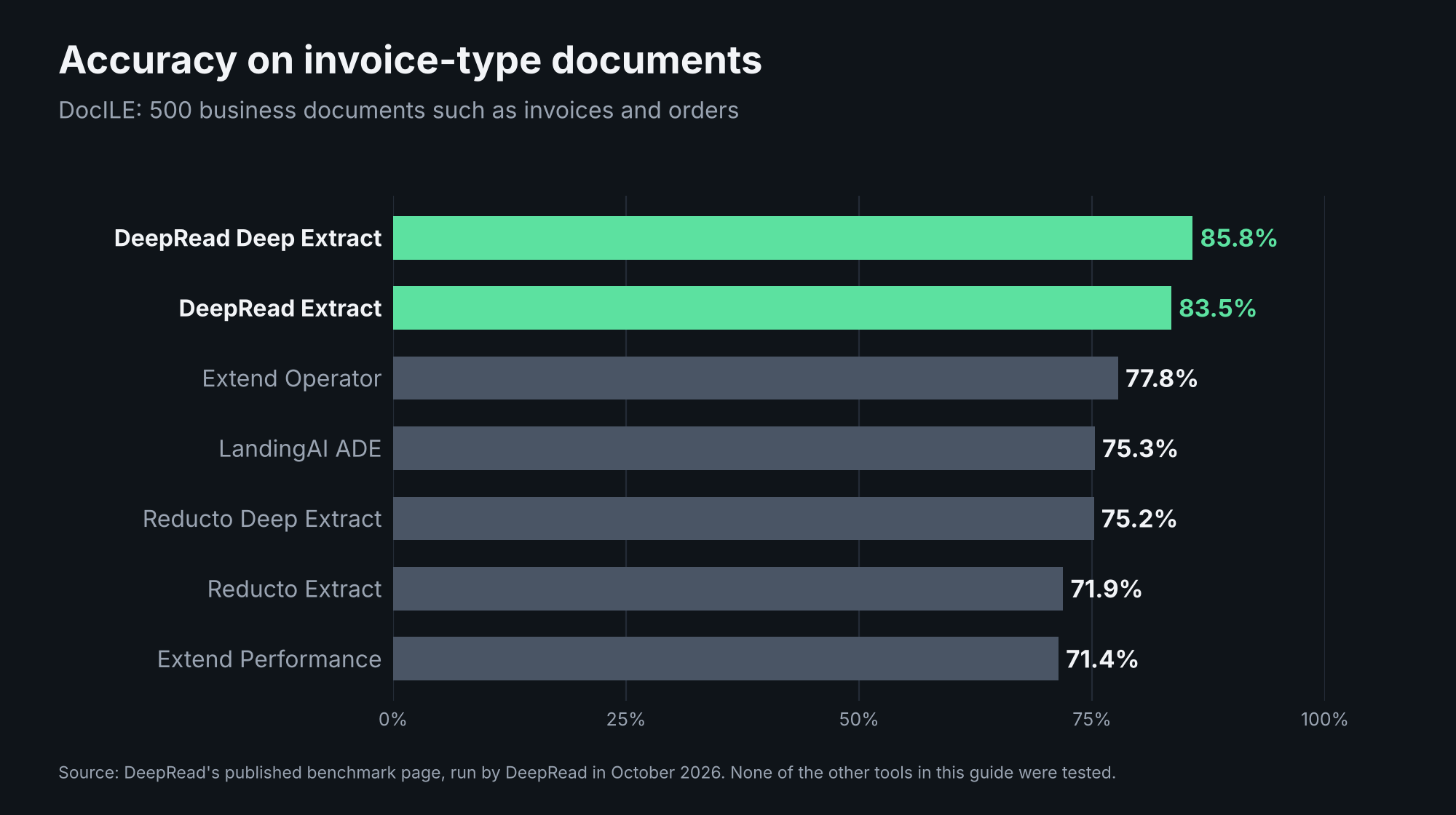
DeepRead publishes its own benchmark results comparing its two pipelines with Extend, Reducto and LandingAI. On DocILE, a set of 500 business documents such as invoices and orders, DeepRead Deep Extract scored 85.8% and DeepRead Extract 83.5%, against 77.8% for the next best system, Extend Operator. A value counts as correct when it matches the answer key exactly, after normalization, or when a reviewer model finds the difference immaterial, and a document a system did not return scores zero.
Read it with the right scope. DeepRead ran the test itself in October 2026, DocILE covers invoices and orders rather than invoices alone, and none of the nine tools in this guide were included. Even the top score leaves room for errors, so a review step for flagged fields still matters.
How to Evaluate an Invoice OCR API
- Run your own invoices through it, not a demo invoice. Format inconsistency across your real vendor base is where accuracy claims tend to fall apart.
- Check field coverage against your needs. Decide whether you need line-item extraction, tax breakdowns or PO matching, and whether the API returns them without custom configuration.
- Test actual latency. If your workflow depends on near-real-time approval, batch-oriented APIs may not fit regardless of accuracy.
- Ask what happens to low-confidence fields. A flagged uncertain field is safer than one silently returned wrong, especially when the data feeds a payment workflow.
- Confirm compliance certifications directly. Check SOC 2, GDPR and HIPAA with the vendor rather than trusting a badge on a marketing page.
- Check whether accuracy claims are verifiable. Ask what document set a number was measured against and whether the method is public.
- Model the real cost. Per-page, per-document, per-block and license pricing behave very differently at your volume and document length.
Conclusion
There is no single best invoice OCR API. Veryfi suits teams that want a purpose-built financial document API with fraud signals. Amazon Textract, Azure and Google Document AI suit teams already inside those clouds that are willing to build the surrounding pipeline. Nanonets, Docsumo and Parseur suit teams that want no-code setup, with different pricing models and depth. ABBYY suits large enterprises with budget for a mature platform, and IronOCR suits .NET teams that want a component rather than a service. Every option has a specific limitation worth knowing before you commit, and none is disqualifying on its own. What should disqualify a choice is skipping the step of testing accuracy on your own invoices.
FAQ
What is the difference between a general OCR API and an invoice-specific one?
A general OCR API extracts text and requires custom work to map it to invoice fields such as line items or PO numbers. An invoice-specific API or model, such as Textract's Analyze Expense or Google's Invoice Parser, is pre-trained on invoice layouts and returns those fields directly without custom template configuration.
Is a specialist invoice OCR API always better than a general-purpose one?
Not necessarily. It depends on your infrastructure and whether invoices are your only document type. Teams standardized on AWS, Azure or Google Cloud often get strong results from that provider's prebuilt models without adding a vendor, while teams that want built-in fraud checks may prefer a purpose-built option.
Does OCR speed matter for invoice processing?
It depends on your workflow. If invoices need near-real-time approval or immediate ERP sync, low-latency synchronous processing matters. If you process large batches on a schedule, such as end of day or end of month, asynchronous batch processing is usually simpler and often more cost-effective.
How is invoice OCR accuracy measured?
It should be checkable: the same invoice dataset run through multiple engines and compared against a manually verified ground truth, with the method published. If a vendor's accuracy claim does not say what it was measured against, treat it as a starting point rather than a verified figure.
Do I need fraud detection built into my OCR API?
Either approach can work. Some invoice-specialist APIs offer duplicate and tamper detection, which saves you from building that logic. General-purpose extraction APIs typically leave fraud checks to your downstream workflow, which gives more control but more implementation work.
More articles
Semantic Document Search: How It Works and How to Build It with Embeddings
How semantic document search works, plus a Python build: extract, chunk, embed, and search, with a tested keyword, semantic, and hybrid comparison.
How to Parse a PDF File: Methods, Libraries, and Tools
Parse a PDF file in Python with tested code: check the text layer, extract text and tables, OCR scanned pages, and compare pypdf, pdfplumber, and PyMuPDF