%20{%20:root%20{%20--deepread-stroke:%20%23E5E7EB;%20}%20}%20.dark%20{%20--deepread-stroke:%20%23E5E7EB;%20}%20%3c/style%3e%3crect%20x='40'%20y='30'%20width='220'%20height='260'%20rx='28'%20ry='28'%20stroke='var(--deepread-stroke)'%20stroke-width='16'%20fill='none'/%3e%3cpath%20d='M180%2030v52c0%2010%208%2018%2018%2018h62'%20stroke='var(--deepread-stroke)'%20stroke-width='16'%20fill='none'/%3e%3cline%20x1='70'%20y1='130'%20x2='200'%20y2='130'%20stroke='var(--deepread-stroke)'%20stroke-width='16'%20stroke-linecap='round'/%3e%3cline%20x1='70'%20y1='165'%20x2='200'%20y2='165'%20stroke='var(--deepread-stroke)'%20stroke-width='16'%20stroke-linecap='round'/%3e%3cline%20x1='70'%20y1='200'%20x2='170'%20y2='200'%20stroke='var(--deepread-stroke)'%20stroke-width='16'%20stroke-linecap='round'/%3e%3c!--%20green%20download%20arrow%20in%20bottom%20right%20corner%20--%3e%3cpath%20d='M210%20202v58'%20stroke='var(--deepread-accent)'%20stroke-width='18'%20stroke-linecap='round'/%3e%3cpath%20d='M195%20245l15%2015%2015-15'%20fill='none'%20stroke='var(--deepread-accent)'%20stroke-width='18'%20stroke-linecap='round'%20stroke-linejoin='round'/%3e%3c/svg%3e)
Top AI Platforms for Document Extraction: A Technical Comparison
Comparing AI platforms for document extraction — legacy OCR/IDP APIs vs. newer agentic platforms — and how to actually evaluate one before you build on it.
Document extraction has split into two generations of tooling. Established cloud APIs and IDP platforms are built around structured field extraction from known document types. Newer AI-native platforms use vision-language models to treat extraction as a reasoning problem, parsing nested tables, mixed layouts and multimodal content that older pipelines handle inconsistently.
If you are weighing a managed service against building your own parsing layer, how AI document parsing works is a useful primer before you shortlist anything.
This guide compares both categories, covers what genuinely differs between them, and shows how to evaluate one before you build a pipeline on top of it. Pricing and limits below come from each vendor's own pages as of November 2026, and prices change often, so confirm current figures before you commit.
Who This Guide Is For
- Developers and engineering teams building document extraction into a product, RAG pipeline or internal tool.
- Technical leads scoping agents, copilots or search systems that depend on clean document ingestion as an upstream step.
- Product and operations teams deciding whether an established extraction API or a newer agentic platform fits their document mix.
Teams that want the wider market view can start with a broader look at data extraction platforms.
Two Categories, Not One Market
Cloud and IDP Platforms
Deepread, AWS Textract, Google Document AI, Azure Document Intelligence, Nanonets, Docsumo, Hyperscience and ABBYY center on structured field and table extraction, typically through pre-built or trainable models for document types such as invoices, receipts and forms. A useful way to split this group:
- API-first platforms for pipeline integration: Amazon Textract, Google Document AI and Azure Document Intelligence.
- No-code or low-code tools for direct business use: Nanonets and Docsumo.
- Validation-heavy platforms built for document operations at volume: Docsumo, Hyperscience and ABBYY.
Rossum used to appear in the no-code group, but Coupa acquired it on May 12, 2026, so it is now part of a broader spend management suite rather than a standalone extraction vendor.
For background on how classic recognition engines differ from newer model-based approaches, see OCR platforms explained.
AI-Native and Agentic Platforms
LlamaParse and similar newer entrants treat extraction as a semantic problem rather than a spatial one. They use large language and vision-language models to understand document hierarchy and context instead of matching text against a fixed template. This connects document understanding directly to RAG systems, chat interfaces and agent workflows, which is why the category is concentrated among developers building LLM applications rather than teams automating one back-office workflow.
Teams whose files arrive in awkward formats can pair an agentic parser with PDF conversion APIs as a first step.
Neither category is strictly better. A platform optimized for RAG ingestion and semantic table reconstruction is not automatically the right choice for high-volume, field-level invoice extraction into an ERP, and the reverse is also true.
Platform Comparison
The descriptions below reflect each vendor's own public positioning. No independent benchmark measures this entire list on a common dataset, so treat accuracy figures as vendor-reported. If Nanonets is on your shortlist, Nanonets alternatives shows how it stacks up against similar tools.
Cloud and IDP Platforms
DeepRead
- What it automates: Extraction of structured fields from PDFs and images into schema-validated JSON, with the page, bounding box, and source text for each field. Uncertain fields are flagged with needs_review and a review_reason. It offers Extract and Deep Extract tiers, and an optimizer that tunes the prompt and schema against ground-truth examples you provide.
- Pricing: The Free plan gives 2,000 pages a month with no card. Standard has no monthly page limit and costs $15 per 1,000 pages for Extract and $35 per 1,000 pages for Deep Extract. Enterprise pricing is custom.
- Limits: Free handles documents up to 50 pages and 15 MB (PDF, PNG, and JPEG) at 10 requests a minute. Standard raises that to 1,000 pages, 50 MB, and 100 requests a minute, and adds more file types, including DOCX and TIFF. Enterprise supports up to 2,000 pages, 500 MB, and 500 requests a minute. It is hosted only, processes in US East by default, offers no self-hosted option, and does not sign a BAA on any plan.
- Best for: Developers who want field-level extraction with source provenance and review flags from a single API, without building the review layer themselves.
- Pros: Page, bounding box, and source text on every field, review flags and a review interface on every plan, a free tier of 2,000 pages a month, published per-1,000-page pricing, and no charge for failed jobs.
- Cons: Hosted only, with no BAA, so it doesn't suit teams that need self-hosting or a HIPAA agreement. Standard caps documents at 1,000 pages and 50 MB, and Free at 50 pages and 15 MB. Webhooks require the Standard plan or above. Amazon Textract
- What it automates: Text, handwriting, forms, tables, queries and signatures through the Analyze Document API, plus separate APIs for expenses, IDs and lending documents. Results include confidence scores.
- Pricing: Pay per page. Detect Document Text is $0.0015 per page, tables are $0.015 and forms are $0.05 for the first million pages in US West (Oregon). The free tier lasts three months for new AWS customers.
- Limits: The free tier covers 1,000 pages a month for text detection and 100 pages a month for forms, tables and layout. Custom Queries have no free tier. Synchronous calls suit single-page documents, and multipage files use asynchronous operations.
- Best for: Teams already building on AWS that want a pay-as-you-go API with no minimums.
- Pros: Flat per-page pricing, deep integration with AWS services, and separate APIs for common document families.
- Cons: Feature combinations stack up in cost, you build the review step and workflow yourself, and it is tied to the AWS ecosystem.
Google Document AI
- What it automates: OCR, form parsing, layout parsing with chunking, custom extraction, classification, splitting and pretrained parsers for invoices, expenses, lending and identity documents. Newer layout parser versions are powered by Gemini models and sit in preview.
- Pricing: Enterprise Document OCR is $1.50 per 1,000 pages, Layout Parser is $10 per 1,000 pages, and Form Parser and Custom Extractor are $30 per 1,000 pages. The invoice parser costs $0.10 per document of up to 10 pages. The first 1,000 OCR pages each month are free.
- Limits: Online requests accept 15 pages, or 30 in imageless mode. Batch limits are 500 pages for OCR and layout and 100 pages for Form Parser. Preview layout versions that call the Gemini global endpoint are not compliant with data residency standards.
- Best for: Teams standardized on Google Cloud that want pretrained processors alongside custom ones.
- Pros: Transparent per-1,000-page pricing, broad processor catalog, and layout parsing built for RAG chunking.
- Cons: Form Parser pricing is high at volume, page limits require batch jobs for long files, and some newer versions are still in preview.
Azure Document Intelligence
- What it automates: Read (OCR), layout, prebuilt models for invoices, receipts, IDs, tax forms and contracts, custom classification and custom extraction. Microsoft now brands it Azure Document Intelligence in Foundry Tools.
- Pricing: Pay as you go, billed per page. Public list prices are about $1.50 per 1,000 pages for Read and $10 for prebuilt and layout models. Commitment tiers discount high volume. Confirm current rates for your region on the Azure pricing page.
- Limits: The free tier (F0) gives 500 pages a month, processes only the first two pages of each document and caps files at 4 MB. The paid S0 tier handles up to 2,000 pages and 500 MB per file.
- Best for: Teams standardized on Microsoft and Azure that want enterprise identity, networking and compliance tooling around extraction.
- Pros: Generous free allowance for testing, container deployment options, and a wide set of prebuilt models.
- Cons: The free tier silently drops pages after the second, newer prebuilt models may be limited to the latest API version, and review tooling is yours to build.
Nanonets
- What it automates: No-code document capture and workflows for invoices, receipts and other business documents, with models that learn from corrections.
- Pricing: The pay-as-you-go Starter plan is $0.30 per page after free pages. Higher plans are quoted, so confirm current terms with the vendor.
- Limits: Nanonets' help center describes the Starter model as limited, with a small field count on custom-trained models, a cap on the number of Starter models and no white-labelled interface.
- Best for: Non-technical teams that want fast, template-free setup and ERP or accounting integrations.
- Pros: Low barrier to start, workflow builder, and integrations with common accounting and ERP systems.
- Cons: Starter limits push serious use toward quoted plans, and cost can climb for low-volume or small-scale use.
Docsumo
- What it automates: Classification, splitting, extraction and validation for bank statements, pay stubs, tax returns, ACORD forms and invoices, with a review queue, API and webhooks. Cross-document validation sits on the Enterprise plan.
- Pricing: A free trial covers 1,000 pages for 14 days. Business and Enterprise plans are quoted, with discounts on annual plans.
- Limits: It runs in the cloud only, with no on-premises option. The 99% field-level accuracy figure is vendor-reported.
- Best for: Lending, insurance and AP teams that want a validation layer and a review queue around extraction.
- Pros: Strong fit for financial documents, SOC 2 Type 2, HIPAA and GDPR positioning, and exportable audit logs.
- Cons: Pricing is not published, and the tool is aimed at operations teams rather than developers who want a bare parsing API.
Hyperscience
- What it automates: Intake, classification, field extraction and transcription, including handwriting, with targeted human-in-the-loop review driven by an accuracy target you set.
- Pricing: Volume-based and not published, with unit cost per page falling as volume grows.
- Limits: Aimed at enterprise programs, with a demo-led buying process. The vendor reports 99.5% accuracy for customers, which is a vendor claim. It can run as software, SaaS or hybrid cloud.
- Best for: Regulated, high-stakes document operations such as public sector and financial services.
- Pros: Review is targeted at specific fields rather than whole documents, handwriting support, and flexible deployment.
- Cons: Longer setup than API-first tools, and pricing is opaque until you talk to sales.
ABBYY
- What it automates: ABBYY Vantage is a cloud-native platform with pre-trained document skills, and FlexiCapture is a capture platform that can be deployed on premises. Both cover classification, extraction and validation.
- Pricing: Subscription based and quoted. Pricing is not published on the pages reviewed.
- Limits: FlexiCapture needs more development effort than Vantage, and its out-of-the-box coverage is centered on invoices, purchase orders and receipts. ABBYY reports support for more than 200 languages.
- Best for: Enterprises with existing ABBYY infrastructure or a need for on-premises capture.
- Pros: Long enterprise track record, a skills marketplace, and both cloud and on-premises options.
- Cons: Two product lines to choose between, quote-based pricing, and heavier implementation than a pay-per-page API.
AI-Native and Agentic Platforms
LlamaParse
- What it automates: Layout-aware parsing into markdown and JSON, schema-based extraction, classification and splitting, using LLMs and vision-language models routed by tier.
- Pricing: Credit based, with 1,000 credits equal to $1.25. Parsing costs 1 credit per page for Fast, 3 for Cost-effective, 10 for Agentic and 45 for Agentic Plus. Plans include a free tier with 10,000 credits a month, Starter at $50 a month and Pro at $500 a month.
- Limits: It is a hosted API, and standard plans process documents in the vendor's cloud. Extraction tiers add credits on top of parsing, and schemas above 250 fields cost more. Extraction can return citations and confidence scores on supported tiers.
- Best for: Developers building RAG pipelines or LLM applications on complex documents.
- Pros: Four price points, a free tier big enough to test real files, and structured outputs designed for LLM consumption.
- Cons: Agentic tiers can get expensive at volume, benchmark claims come from the vendor's own tests, and reasoning-heavy parsing is slower than a purpose-built extraction API.
What Actually Differs, Beyond the Category Label
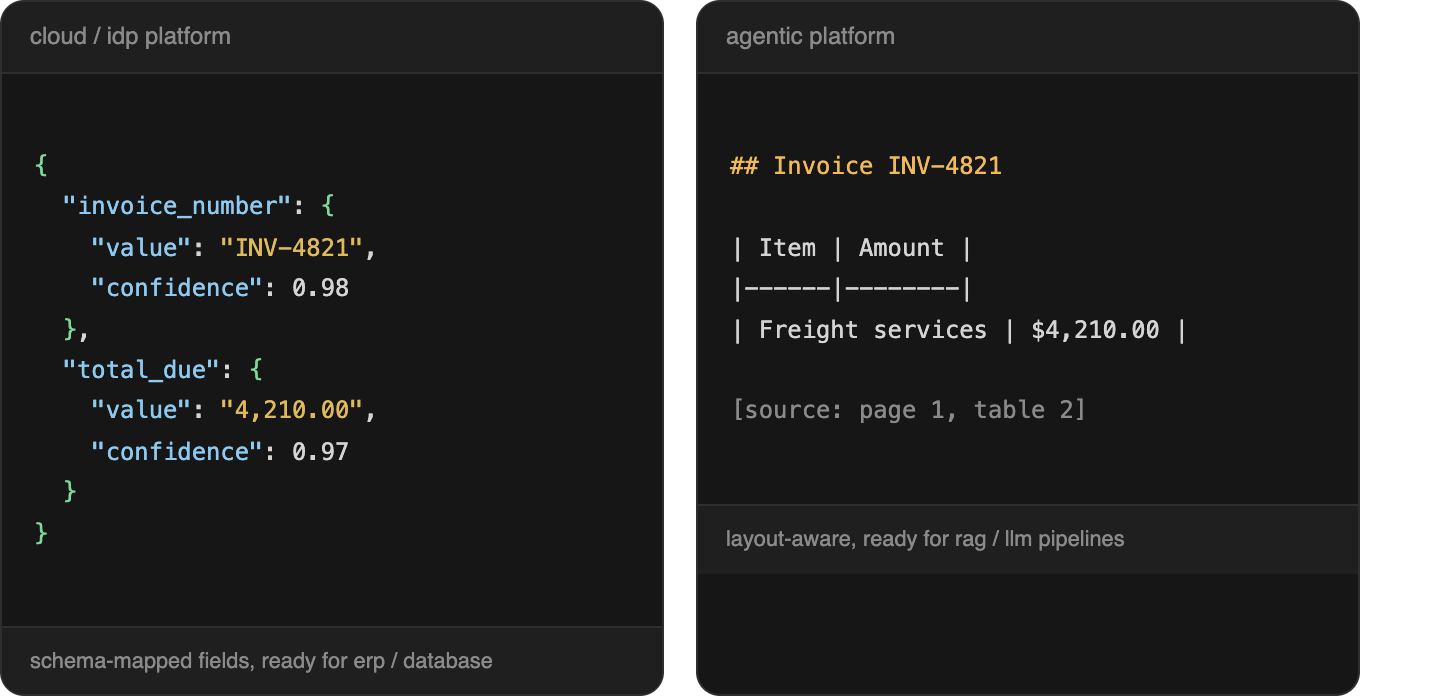
- Output format and structure. Legacy IDP platforms typically return structured fields mapped to a schema, which suits a database or ERP. Agentic platforms increasingly output markdown or structured JSON optimized for LLM consumption, which matters if the downstream use is a RAG pipeline or an AI agent.
- Handling unfamiliar documents. Systems that rely on templates or rigid rules need updates as formats change. Single-document accuracy in a demo does not guarantee correctness across a varied document set, and that holds for both categories. Agentic platforms reduce this risk but do not remove it.
- Validation and confidence handling. This is where platforms diverge most in practice. Some surface field-level confidence scores and citations, others return output with no signal about which fields are uncertain, and others route low-confidence fields to a review queue. It determines whether a bad extraction fails silently or gets flagged.
- Document class fit. Structured documents with a fixed schema are fast to extract and stay reliably queryable. Semi-structured documents that share field types but vary in layout need more reasoning from the system, which is where the legacy versus agentic distinction tends to matter most.
How to Evaluate a Platform
The right tool depends on how inconsistent your documents are, how much validation you need, and whether you are solving extraction alone or building a system that has to survive production. In practice:
- Test on your own messy documents, not a demo set. The gap between a clean sample and real accuracy is where vendor claims tend to break down.
- Check whether accuracy claims are independently verifiable. Ask what document set a number was measured against and whether you can reproduce it.
- Confirm the output format matches your downstream use. Structured JSON for a database, markdown for an LLM pipeline. A mismatch creates post-processing work regardless of extraction quality.
- Check integration depth, not just existence. Native connectors to your ERP, CRM or content system differ from open APIs for custom work, and integration gaps are where projects stall after the pilot looks good.
- Understand the cost and latency model. Reasoning-heavy extraction is often slower and priced differently from a purpose-built API, which matters at production volume.
- Look at what happens to uncertain fields. Find out whether the platform flags them, why, and where a reviewer sees the source.
Checking Accuracy and Review Behavior Yourself
Most of the comparison above rests on public positioning, since no single benchmark covers this entire list on common ground. The way to close that gap is to run the same sample of your own documents through two or three candidates and compare against a manually verified ground truth.
During that test, look at how each tool reports uncertainty and where its answers come from. DeepRead, profiled above, is one example: it returns the page, bounding box, and source text for each field, and marks uncertain fields with needs_review plus a review_reason instead of a numeric confidence score. A review interface for flagged fields is available on every plan, and a failed job costs nothing. Processing is job-based with polling, and webhooks are available on the Standard and Enterprise plans only.
Teams with strict infrastructure requirements should check hosting and BAA terms for every candidate. DeepRead processes in US East by default, offers no self-hosted option, and does not sign a BAA on any plan. Whichever platform you test, ask for the same things: a dataset and method you can check yourself, not a headline number.
Conclusion
“AI platform for document extraction” now covers two genuinely different approaches: structured field extraction from established cloud and IDP platforms, and semantic, agentic parsing from newer LLM and VLM-native tools. Neither wins outright. The right choice depends on your document class, your downstream use (system-of-record update versus LLM pipeline) and how much validation your use case demands. What holds across both categories is to test on your real documents before committing and to treat any accuracy claim you cannot verify independently as a starting point for evaluation, not a final answer.
FAQ
What is the difference between traditional OCR platforms and agentic document AI platforms?
Traditional OCR and IDP platforms extract structured fields using template or model-based matching tuned to specific document types. Agentic platforms use vision-language models to reason over layout and meaning more holistically, generally handling complex, nested or multimodal documents with less tuning, at the cost of typically higher latency and cost per document.
Which document extraction platform has the best accuracy?
It varies by document type and cannot be answered with a single ranking. A platform strong on invoices may perform differently on handwritten forms or nested tables. Ask any vendor what its accuracy claim was measured against and whether it is independently checkable.
Do I need an agentic platform, or is a traditional extraction API enough?
If your documents are standard, single-format and feed a structured system such as an ERP, a traditional extraction API is usually simpler and cheaper. If you are building a RAG pipeline or handling complex, varied or multimodal documents, agentic platforms are built for that reasoning-heavy case.
Is Nanonets or Docsumo a better fit for financial document extraction?
They serve different scopes. Docsumo is positioned around lending, insurance and AP workflows such as bank statements, pay stubs and tax returns, with a review queue and validation rules. Nanonets covers a broader range of business documents with a no-code setup. The right fit depends on whether your use case is narrowly financial or spans several document categories.
How is document extraction accuracy measured, and can I trust a vendor's number?
Rigorously, it should be checkable: the same document set run through multiple platforms, compared against manually verified ground truth, with the method published. If a vendor's claim does not say what it was measured against, treat it as a marketing figure until you can check it yourself.
More articles
Semantic Document Search: How It Works and How to Build It with Embeddings
How semantic document search works, plus a Python build: extract, chunk, embed, and search, with a tested keyword, semantic, and hybrid comparison.
How to Parse a PDF File: Methods, Libraries, and Tools
Parse a PDF file in Python with tested code: check the text layer, extract text and tables, OCR scanned pages, and compare pypdf, pdfplumber, and PyMuPDF