%20{%20:root%20{%20--deepread-stroke:%20%23E5E7EB;%20}%20}%20.dark%20{%20--deepread-stroke:%20%23E5E7EB;%20}%20%3c/style%3e%3crect%20x='40'%20y='30'%20width='220'%20height='260'%20rx='28'%20ry='28'%20stroke='var(--deepread-stroke)'%20stroke-width='16'%20fill='none'/%3e%3cpath%20d='M180%2030v52c0%2010%208%2018%2018%2018h62'%20stroke='var(--deepread-stroke)'%20stroke-width='16'%20fill='none'/%3e%3cline%20x1='70'%20y1='130'%20x2='200'%20y2='130'%20stroke='var(--deepread-stroke)'%20stroke-width='16'%20stroke-linecap='round'/%3e%3cline%20x1='70'%20y1='165'%20x2='200'%20y2='165'%20stroke='var(--deepread-stroke)'%20stroke-width='16'%20stroke-linecap='round'/%3e%3cline%20x1='70'%20y1='200'%20x2='170'%20y2='200'%20stroke='var(--deepread-stroke)'%20stroke-width='16'%20stroke-linecap='round'/%3e%3c!--%20green%20download%20arrow%20in%20bottom%20right%20corner%20--%3e%3cpath%20d='M210%20202v58'%20stroke='var(--deepread-accent)'%20stroke-width='18'%20stroke-linecap='round'/%3e%3cpath%20d='M195%20245l15%2015%2015-15'%20fill='none'%20stroke='var(--deepread-accent)'%20stroke-width='18'%20stroke-linecap='round'%20stroke-linejoin='round'/%3e%3c/svg%3e)
Unstructured Data Extraction Tools: How to Choose by Input Type
Choose unstructured data extraction tools by input: PDFs, scans, emails, images, and long reports. Tested Python code, honest limits, and when an API fits.

Most lists of unstructured data extraction tools put very different products side by side: a free Python library, a hosted API, and an enterprise suite. They can all claim to "extract unstructured data," yet they handle different inputs and return different outputs. A library that reads text from a PDF does nothing for a scanned page, and a tool built to feed a search index does not hand you an invoice total.
This guide sorts the tools by what you are feeding them. It covers documents, scans, emails, images, and long mixed files. It leaves out web scraping and database pipelines, which are separate jobs. DeepRead's data extraction platform guide explains how those categories differ, and this article stays on the document side of that line.
The examples come from a small test: a two-page PDF with one text page and one scanned page, attached to an email. Every code block was run, and the output shown is what it printed.
Start With Two Questions
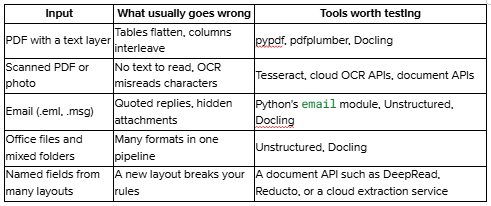
What is the input? A PDF with a text layer, a scan, a photo, an email, or an Office file each fails in a different way. Choose the tool by the way your input fails.
What is the output for? If the result feeds search or a language model, you want clean text split into chunks. If it feeds a payment, a record, or a decision, you want named fields, each with the place on the page it came from. DeepRead's guide to structured data extraction explains why that second job is a different problem from reading text.
Which Tools to Test for Each Input
PDFs and Scans
Check each page for a text layer before choosing anything. A PDF exported from software carries text, and a library can read it. A PDF made by scanning paper carries only an image, so a library returns nothing and you need OCR. Many files mix both.
For text pages, pypdf returns the text and pdfplumber returns tables and word positions. pypdf's documentation states that it is not OCR software and will never extract text from images. For scanned pages, Tesseract is the usual free starting point, and it works best on images of at least 300 DPI according to its own documentation. DeepRead's walkthrough on extracting data from any PDF shows the hosted route for the same job.
The failure to plan for is the quiet one. A tool can read the text pages, skip the scan, and return no error.
Emails
An email is not one document. It is headers, a body, quoted earlier messages, and attachments, and the valuable data is often in an attachment. Python's standard library reads .eml files, which follow the MIME standard. Outlook .msg files are a different, binary format built on the OLE Compound File structure rather than MIME text, so they need a different parser. Unstructured lists .msg is among its supported types, and Docling's supported-formats page lists EML and MSG with optional attachment name listing.
This function parses an .eml file into its parts:
import email

from email import policy

from io import BytesIO

from pypdf import PdfReader

def read_email(path):

"""Parse an .eml file into headers, body text, and attachments."""

with open(path, "rb") as f:

msg = email.message_from_binary_file(f, policy=policy.default)

body = msg.get_body(preferencelist=("plain", "html"))

return {

"from": msg["From"],

"subject": msg["Subject"],

"date": msg["Date"],

"body": body.get_content().strip() if body else "",

"attachments": [

{"name": part.get_filename(),

"type": part.get_content_type(),

"data": part.get_content()}

for part in msg.iter_attachments()

],

}
On the test email, the headers and body came back separately, and the quoted earlier message stayed inside the body text:
def pdf_pages_with_text(data, min_chars=20):

"""For a PDF attachment, say which pages have a text layer."""

reader = PdfReader(BytesIO(data))

return [len((page.extract_text() or "").strip()) >= min_chars

for page in reader.pages]
The quoted block is a reminder to strip replies before you extract anything from the body, or you may read a value from an old message. Next, check what the PDF attachment actually contains:
def pdf_pages_with_text(data, min_chars=20):

"""For a PDF attachment, say which pages have a text layer."""

reader = PdfReader(BytesIO(data))

return [len((page.extract_text() or "").strip()) >= min_chars

for page in reader.pages]
[True, False]Page 1 has text and page 2 does not, so page 2 needs OCR.
What Unstructured Did With the Same Email
Unstructured's partition_email is the quicker route for pipelines, and in version 0.27.37 it processes attachments by default. On the test email, it returned 21 elements, including the statement text from the PDF's first page. It returned nothing from page 2, the scanned remittance note, and it gave no warning about the missing page. The text Remittance advice and the reference number never appeared in the output. The auto and fast strategies both behaved this way. Setting strategy="ocr_only" recovered the page in the same test: 11 elements, with Remittance advice and PAY-90417 present. We could not test hi_res here because the model download was blocked, so check that strategy yourself.
That is not a reason to avoid the tool. It is a reason to test with a scanned page in your sample and check that every page is accounted for. The same output also labeled Widget A, qty 4 as a Title, which shows how element labels are heuristics, not facts.
Images and Photos
Receipts, screenshots, and phone photos have no text layer, so OCR is the first step. Image quality decides most of the result. Tesseract's documentation recommends at least 300 DPI, and photos usually need straightening and noise removal first. DeepRead's OCR software overview lists the preprocessing steps, such as deskewing and noise removal.
Several tools read images directly. Unstructured lists .bmp, .heic, .jpeg, .png, and .tiff among its supported image types. Docling lists PNG, JPEG, TIFF, BMP, and WEBP as supported image formats. DeepRead's Free plan accepts PDF, PNG, and JPEG, and Standard adds GIF, BMP, TIFF, and WEBP.
OCR can misread a single character. In an earlier test on this same scanned page, Tesseract returned PAY-9041/7 for a reference that read PAY-90417. Identifiers, amounts, and dates need validation, whichever tool reads them.
Long Reports and Mixed Office Files
When the goal is to put many files into a search index or a language model pipeline, you want a tool that handles many formats and returns text in chunks. Two open-source options are worth testing first.
- Unstructured partitions many file types, including PDF, Office files, email, and images, into labeled elements, and its hosted platform adds chunking, embedding, and connectors.
- Docling is a local library that parses PDF, Office files, HTML, images, and EML and MSG email into a unified structure with reading order and tables, and exports Markdown, JSON, HTML, plain text, and chunks.
Both fit the "text for search" job. Neither is built to hand you a validated invoice total, which is the next section.
When You Need Fields, Not Text
Libraries and ingestion tools return text and structure. If your goal is named values, such as an invoice number, a due date, or a gross pay figure, from many layouts, you end up writing rules per layout. That is the case for a document API.
DeepRead takes PDFs and images and returns the fields you define as JSON, each with its page, bounding box, and source text, and a needs_review flag with a reason when a value is uncertain. It also returns the document as Markdown with layout blocks and bounding boxes. Other options in this group include Reducto and the cloud services from Amazon, Google, and Microsoft, and DeepRead's comparison of AI document extraction platforms lines them up.
The practical details, from DeepRead's pricing page:
- The Free plan includes 2,000 pages a month with no card, with documents up to 50 pages and 15 MB.
- Standard has no monthly page limit and charges $15 per 1,000 pages for Extract and $35 for Deep Extract, which adds two OCR engines, adjudication of disagreements between them, and a verification pass on every value.
- Standard accepts documents up to 1,000 pages and 50 MB. Enterprise pricing is custom.
- Processing is hosted only. DeepRead has no self-hosted option and no BAA on any plan.
Hosted processing decides many cases. For files that cannot leave your network, stay with the local tools above. For files that can, test a document API against your own code.
How to Test Before You Commit
- Build a sample per input type. Include 20 to 50 real files, and include your worst ones: a scanned page inside a text PDF, a long email thread, a phone photo.
- Key the correct values by hand. There is no substitute for ground truth.
- Score at field level. Check that each value matches, and report results per input type, not as one blended number.
- Count dropped content. The skipped scanned page above would not show up in a spot check of text that looks fine.
- Measure review effort. How many documents would a person still have to touch?
- Confirm data handling. Check where files are processed and whether you can use a hosted tool at all.
Common Mistakes
- Choosing by category name. "Data extraction" covers web scraping, ETL, OCR, and document APIs. Pick by input and output.
- Testing only clean files. A tool that reads a typed PDF may skip a scanned page without a warning.
- Reading values from quoted email replies. Strip earlier messages before extraction.
- Trusting OCR on identifiers. Validate IDs, amounts, and dates.
- Treating vendor accuracy numbers as your numbers. They come from the vendor's own samples. Run your files.
Conclusion
Unstructured data extraction is several jobs under one name. Match the tool to the input, decide whether you need chunks or fields, and test on files that include the awkward cases. Libraries cover text-layer PDFs and emails cheaply, OCR covers images and scans, ingestion tools cover search pipelines, and a document API covers named values from many layouts.
Start with the two questions, build a sample, and let measured results decide.
FAQ
What are unstructured data extraction tools?
They are tools that turn files without a fixed format, such as PDFs, scans, emails, and images, into text or structured fields. Which tool fits depends on the input type and on whether you need text or named values.
What is the best tool for extracting data from PDFs?
For PDFs with a text layer, pypdf and pdfplumber are free and enough for many jobs. For scanned PDFs you need OCR, and for named fields across many layouts a document API is worth testing.
Can I extract data from emails with Python?
Yes. The standard library's email module reads .eml files into headers, body, and attachments, as shown above. Outlook .msg files need a different parser, and both Unstructured and Docling list .msg support.
Do I need OCR for unstructured data?
Only for pages that are images. Check each page for a text layer first, and run OCR on the pages that have none.
Is open source or a hosted API better?
Open-source tools run on your machine, which suits files that cannot leave your network. A hosted API reduces custom parsing code and returns fields with review flags. Many teams use both.
More articles
Semantic Document Search: How It Works and How to Build It with Embeddings
How semantic document search works, plus a Python build: extract, chunk, embed, and search, with a tested keyword, semantic, and hybrid comparison.
How to Parse a PDF File: Methods, Libraries, and Tools
Parse a PDF file in Python with tested code: check the text layer, extract text and tables, OCR scanned pages, and compare pypdf, pdfplumber, and PyMuPDF